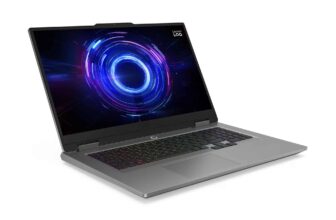
Promo €1099 MSI Cyborg 17 B2RWFKG-061FR Blackwell large format, creative gaming laptop with 144Hz screen under GeForce RTX 5060 and Intel Core 5 210H
Our opinion on the MSI Cyborg 17 B2RWFKG-061FR
In a large, comfortable format, the creative gaming laptop MSI Cyborg 17 B2RWFKG-061FR runs recent games thanks to its latest generation GeForce RTX 5060 ray tracing high-end NVIDIA Blackwell graphics card, which also accelerates multimedia processing. This is also the case with the recent Intel Core 5 210H Raptor Lake Refresh hybrid processor and the powerful 16 GB of RAM as well as the fast 512 GB SSD storage. Responsive, this versatile dark Windows 11 laptop with an original design also features a 17-inch Full HD IPS anti-reflective screen, a backlit keyboard and Wi-Fi 6E, Ethernet and USB-C connectivity.
Features of the MSI Cyborg 17 B2RWFKG-061FR
| Screen(s) | 17.3″ Full HD LED IPS 144Hz (1920×1080, anti-glare) |
| Processor | Intel Core 5 210H Raptor Lake Refresh (8 cores: 4P 2.2 GHz / 4E 1.6GHz, 45W) |
| Installed RAM (max) | 16 GB DDR5 5600MHz (96 GB), 2 slots |
| Graphics card | NVIDIA Blackwell GeForce RTX 5060 8 GB GDDR7 (1455MHz, 55W), Intel Iris Xe integrated into the processor and Optimus |
| Storage | 512GB M.2 SSD (NVMe PCIe 4.0 x4) |
| Connections | 2 USB 3.2 (Gen2) + 1 USB 3.2 Type-C (Gen2), HDMI 2.1 (4K@60Hz) |
| Network | Wi-Fi 6E ax (2×2, Intel AX211), Bluetooth 5.3 + Gigabit Ethernet |
| Backlit keyboard | Yes, 4-zone RGB, 1.7mm travel |
| Numeric keypad | Yes |
| Windows Hello | – |
| Audio system | 2 speakers (2 x 2W) DTS Audio |
| Operating system | Windows 11 64bit |
| Announced autonomy / Battery | 3 hours / Li-Ion 4 cells 55.2Whr (120W adapter) |
| Weight / Dimensions (mm) | 2.5 Kg / 399.3 x 258 x 21.2-22.2 |
The MSI Cyborg 17 B2RWFKG-061FR faces the competition
The MSI Cyborg 17 B2RWFKG-061FR is now available in promotion at the house of Darty and the Fnac. It offers a configuration/price ratio attractive for its category where it is one of the cheapest such a large format to offer such a high-performance and recent graphics card as well as the processor, with Windows provided.
If this laptop PC does not completely meet your needs, we invite you to consult our guides Gaming laptop And Student laptopyou will find other similar laptops that can be good alternatives to the MSI Cyborg 17 B2RWFKG-061FR.
Chassis, connectors, screen of the MSI Cyborg 17 B2RWFKG-061FR
Designed from semi-transparent materials, this versatile laptop cooled by 2 fans shared between the CPU and GPU, heat pipes and air grilles has an original gamer look with its dark angular patterned design.
This creative gaming laptop PC offers good connectivity including Bluetooth 5.3 and Wi-Fi 6E ax wireless modules for communicating and connecting remotely, Ethernet and audio ports, a practical HDMI video output for easily connecting it to a monitor or projector for example as well as 1 USB-C and 2 fast USBs useful for connecting various peripherals.
The chiclet keyboard has a very practical backlighting solution to activate whenever you need to better discern the keys.

With its frequency of 144Hz higher than the standard 60Hz, the screen offers greater fluidity in everyday life, including in games.
Well suited to videos due to its 16:9 format, the Full HD screen adopts an anti-reflective coating ensuring better visibility than a shiny panel in a bright environment (e.g. outdoors).
Performance, autonomy of the MSI Cyborg 17 B2RWFKG-061FR
The MSI Cyborg 17 B2RWFKG-061FR may be of interest to those who wish to equip themselves with a versatile, large-format laptop PC that performs well in creative-oriented gaming equipped with recent components.
It indeed embeds the dedicated high-end NVIDIA GeForce RTX 5060 ray tracing graphics card. Blackwell latest generation through which gamers can play their favorite games.
A big downside, however, for its performance in practice since its TDP is limited to 55W, which is significantly lower than the TDP of the GeForce RTX 5060 integrated in many configurations.
And concretely? Concessions are to be expected under the most demanding titles in 3D resources to obtain good playability.
To play Full HD definition is therefore an undeniable advantage here since it requires less graphics calculations than High Definition (eg: 2.5K), which implies a higher number of fps for a similar configuration.
In any case, the GeForce RTX 5060 will also be of interest to creatives since in applications taking advantage of GPU computing power, it provides graphics acceleration of processing. This is particularly the case under the Adobe suite, VSDC or Vegas.
In practice, the GeForce RTX 5060 is used by NVIDIA Optimus technology to carry out graphics processing deemed too heavy for the Iris Xe, a solution inserted in the processor.
Watching HD photos and videos is obviously possible with the GeForce RTX 5060 or the Iris Xe. The latter, whose benefits are much lower, is nevertheless favored as much as possible by Optimus to ensure the best possible autonomy.
In this regard, while waiting for more concrete tests, expect around 3 hours of battery operation in light use.
Depending on needs, Optimus automatically switches in real time between the Iris Xe and the GeForce RTX 5060.
The Iris Xe takes place in the Core 5 210H, a processor certainly recent but based on the old architecture Raptor Lake Refresh. The Core 5 210H, however, holds its own with its 8 hybrid cores and delivers very good general performance coupled with the 16 GB of RAM.
The Core 5 210H proves more interesting for carrying out processing using multi-cores than a classic Quad Core, such as photo editing or video editing.
However, if the objective is to often carry out work requiring processor resources, it is better to turn to a PC equipped with a (recent) CPU equipped with a greater number of efficient cores.
Silent, energy efficient and very fast, the SSD of course contributes to good overall responsiveness/fluidity.
Under this versatile gaming laptop, accessing online game cards is quick, just like launching games/software, carrying out processing or even starting/stopping.
MSI is integrating a 512 GB SSD here, a standard capacity that is also available in many configurations on the market.
However, if you need additional space, you can expand it by simply plugging in an external storage device. To maximize transfer speed, we will favor the connection of USB 3.2/USB-C support instead of USB 2.0/3.0.
Finally, when pushed hard (e.g. games, treatments), expect this versatile, creative-oriented gaming laptop to heat up and make itself heard.
To contain its temperatures, we can add a ventilated support (remember to check the dimensions carefully!).